
NopFashion Theme + 15 Plugin Bundle for NopCommerce
NopBeauty Theme + 12 Plugin Bundle for NopCommerce
NopNoor Theme + 16 Plugin Bundle for NopCommerce
NopGadget Theme + 18 Plugin Bundle for NopCommerce
NopEthnic Theme + 17 Plugin Bundle for NopCommerce
NopFurniture Theme + 19 Plugin Bundle for NopCommerce
NopPharma Theme + 16 Plugin Bundle for NopCommerce
NopVogue Theme + 17 Plugin Bundle for NopCommerce
NopGadence Theme + 18 Plugin Bundle for NopCommerce
BSS Steadfast Shipping Plugin
Created on: Mar 09, 2026
BSS’s Steadfast Plugin brings your nopCommerce store and Steadfast Courier together, enabling smooth and efficient management of parcel deliveries across Bangladesh. With this plugin, store owners can automate the creation of shipments, send order details directly to Steadfast, and track deliveries without leaving their nopCommerce dashboard. It helps simplify logistics, reduce manual effort, and speed up the fulfillment process. By leveraging Steadfast’s wide delivery network, merchants can provide consistent, reliable shipping to customers nationwide while improving overall operational efficiency and the shopping experience.
Pre-Requisites:
- The plugin requires you to install the BSS Core plugin first.
Installation:
- Go to the Order Details Page and Download plugin package.
- Go to Administration → Configuration → Local plugins
- Within the bundle, you get all the required files, including BSS.Core
- Upload the zip files using the ‘Upload plugin or theme’ button
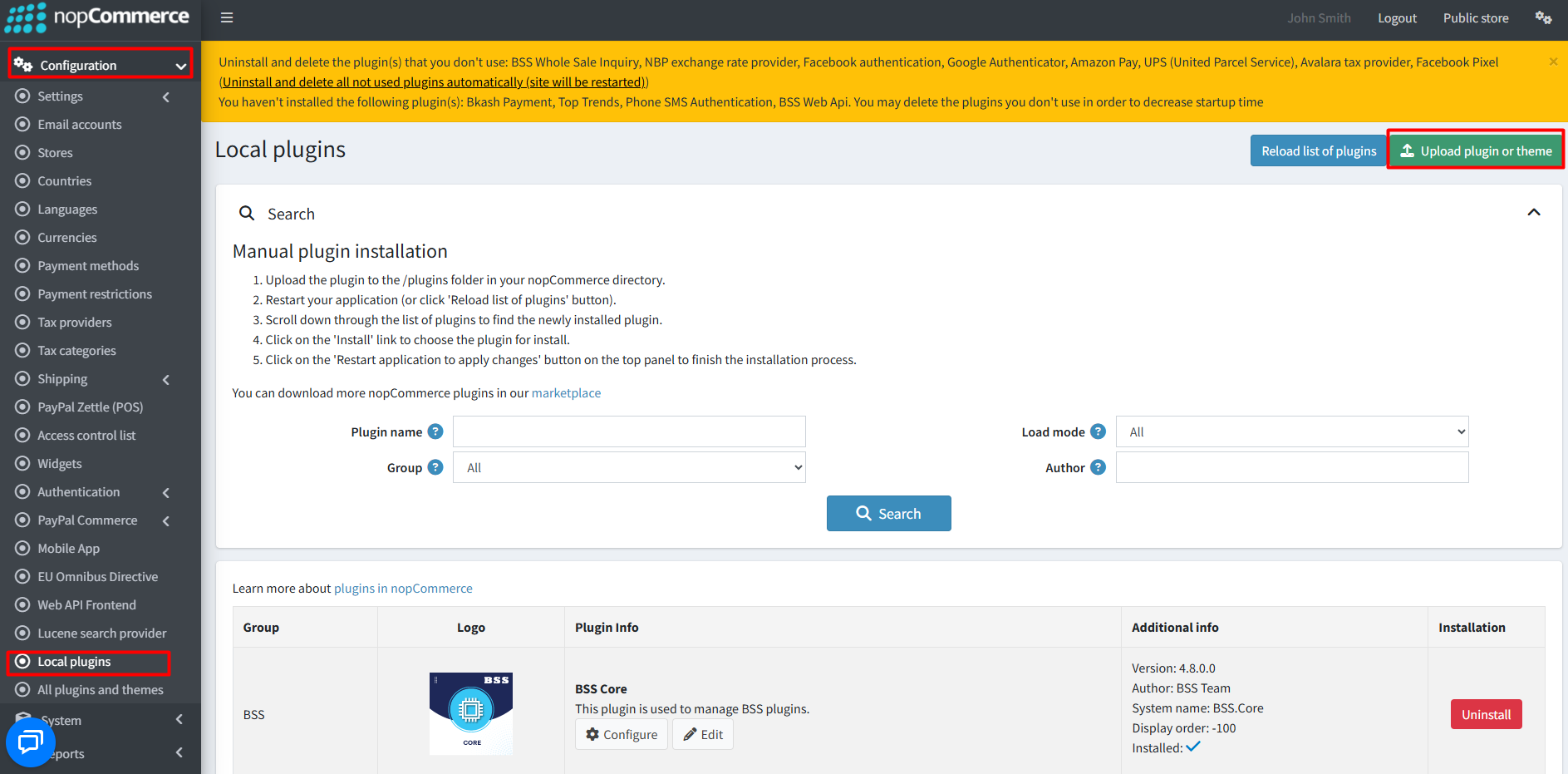
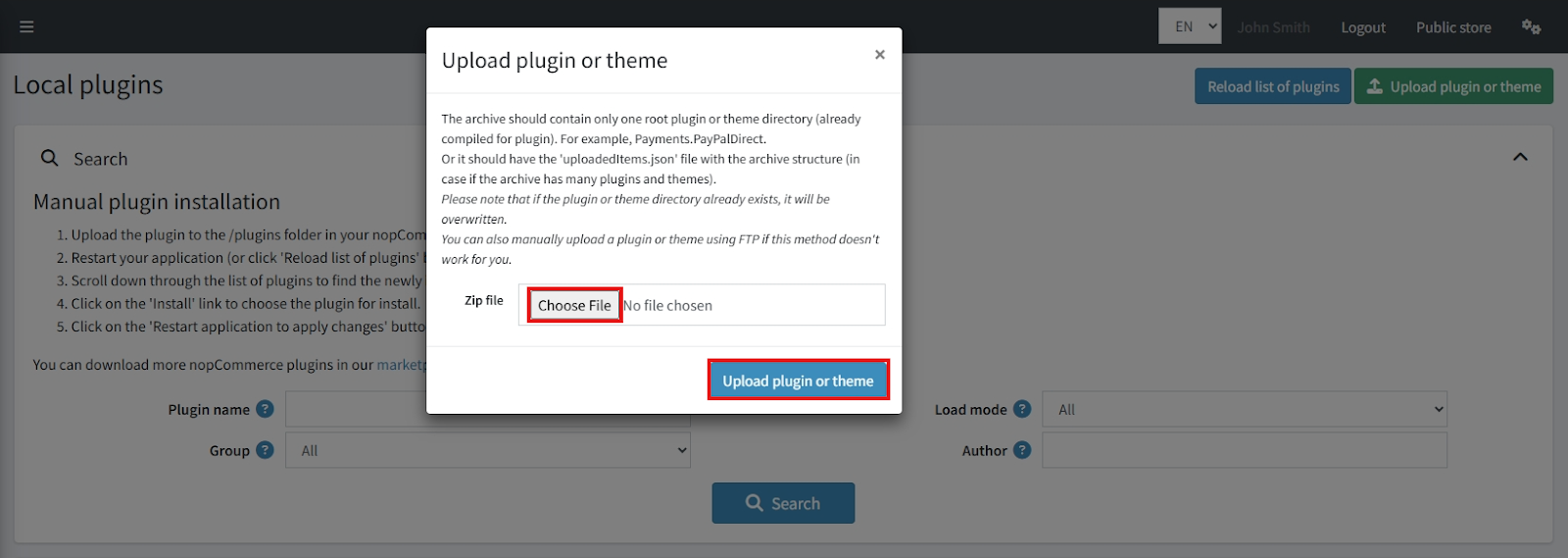
- After uploading, reload the ‘list of plugins’, install BSS Core plugin first. Scroll down or write the name of the plugin in the search bar, then install ‘Steadfast'
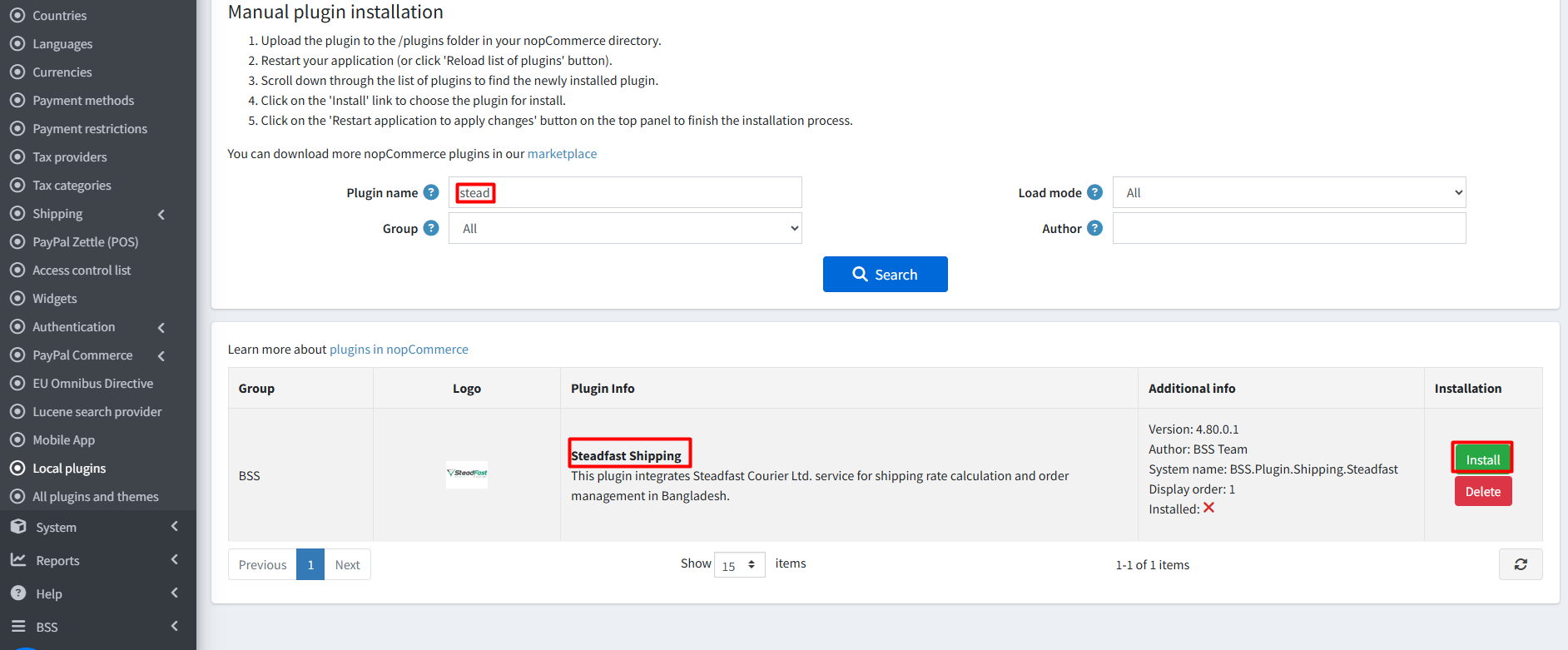
- Restart the application to make the plugins functional.
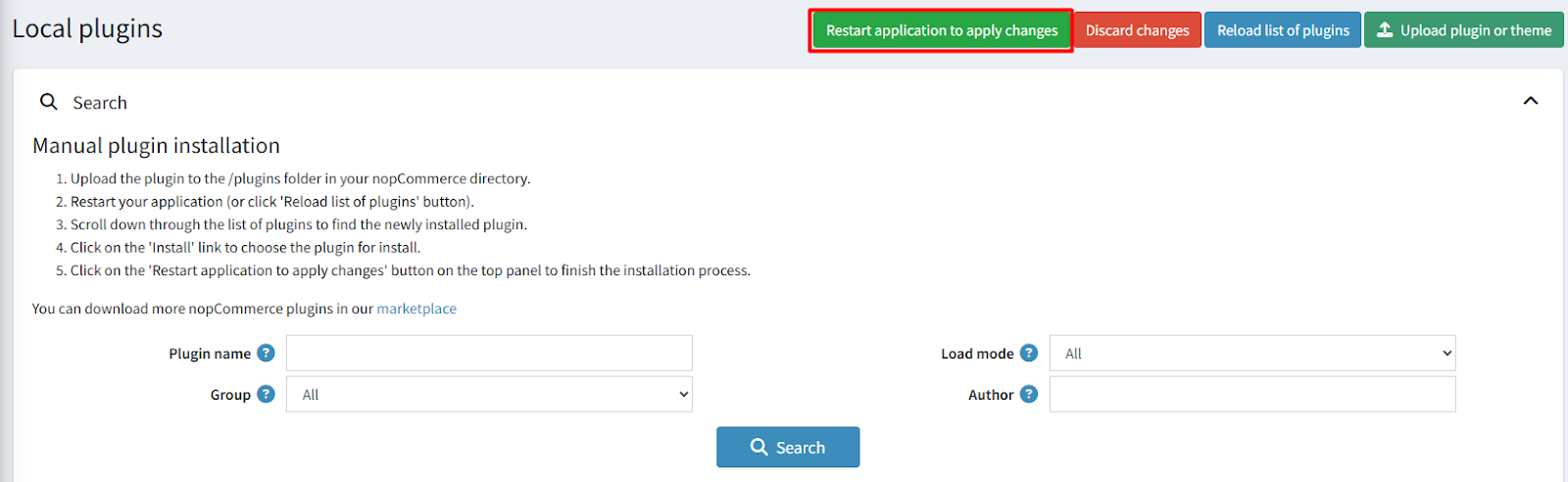
Recommendation: Go to > App Settings. If you find JavaScript bundling and minification, CSS bundling and minification are checked, then uncheck these two options and disable them.

Configuration:
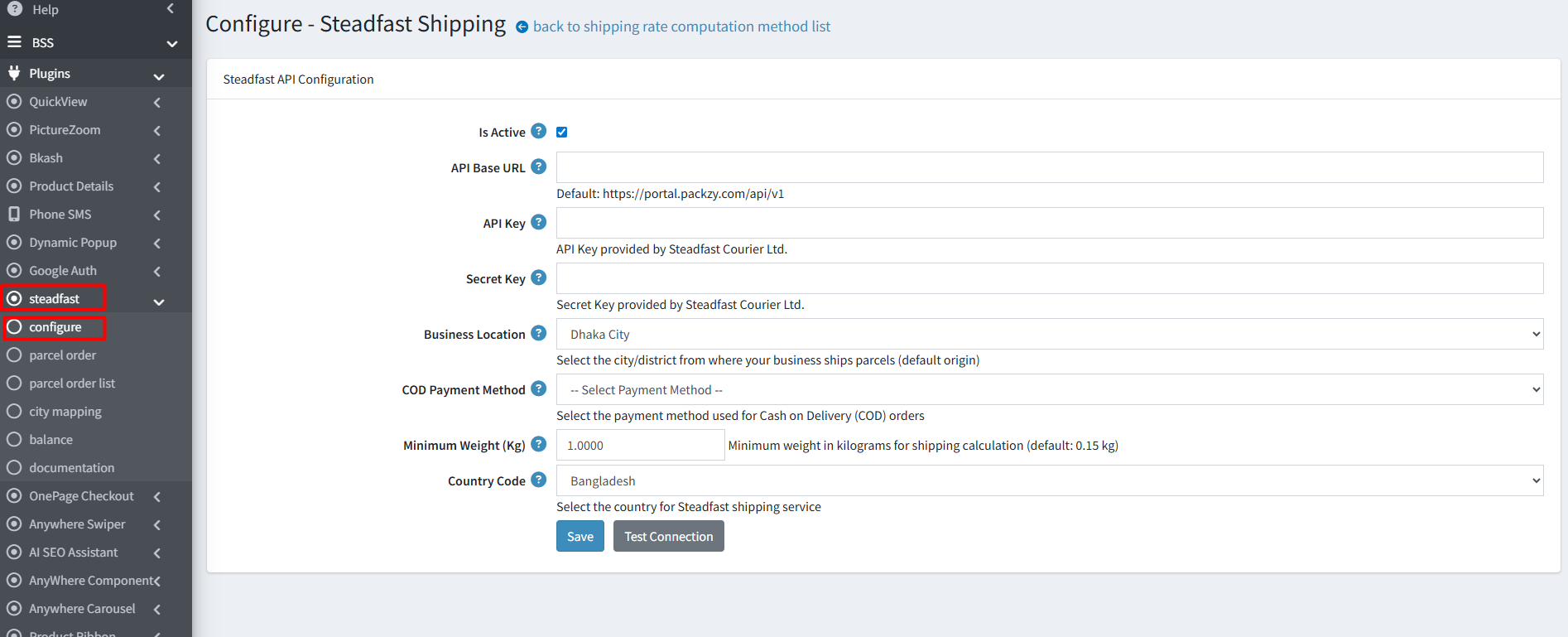
- Go to Admin → BSS → Plugins → Steadfast → Configuration. Enter the License string and save. Then clear cache.

Steadfast API Configuration
- Is Active: Check to enable the plugin.
- API Base URL: Set your Base URL to connect to the Steadfast system.
- API Key: Enter the API Key provided by Steadfast Courier Ltd.
- Secret Key: Enter the Secret Key provided by Steadfast Courier Ltd.
- Business Location: Select the city/district from where parcels will be sent.
- COD Payment Method: Choose the payment method for Cash on Delivery orders.
- Minimum Weight (Kg): Set the default weight for shipping calculations (default: 0.15 kg).
- Country Code: Select Bangladesh for Steadfast shipping services.
- Click Save to save configuration or Test Connection to validate.
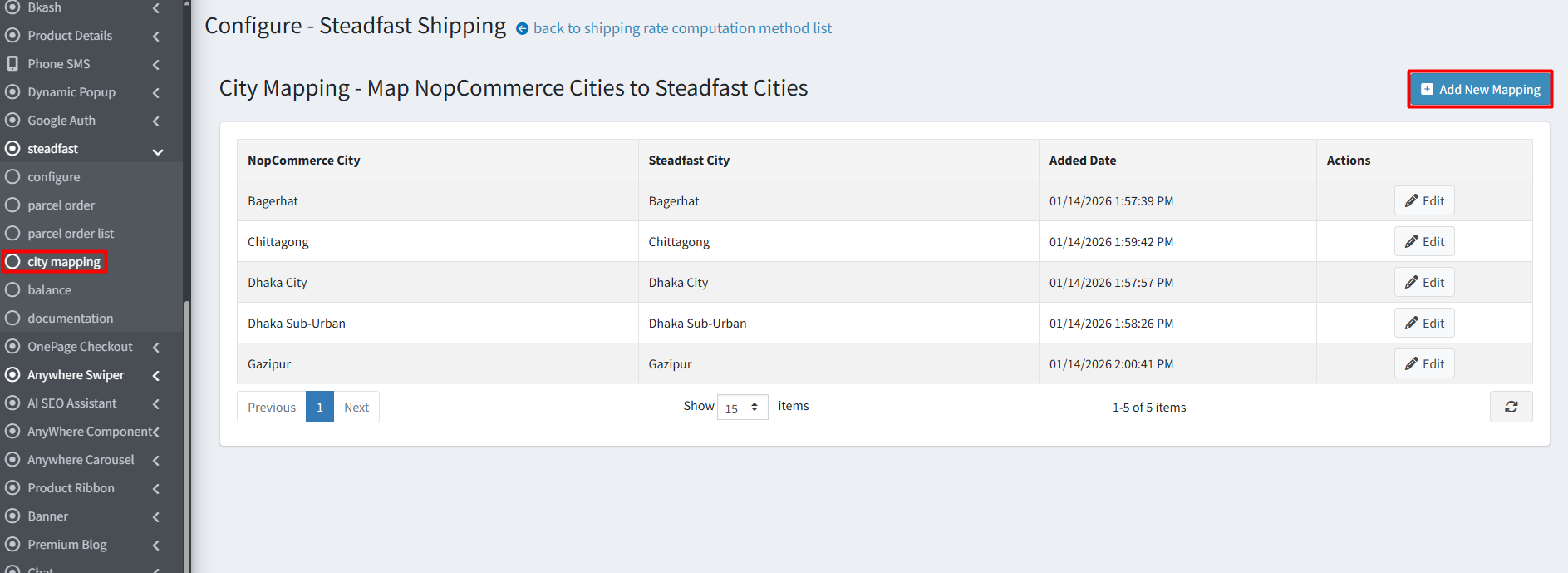
City Mapping
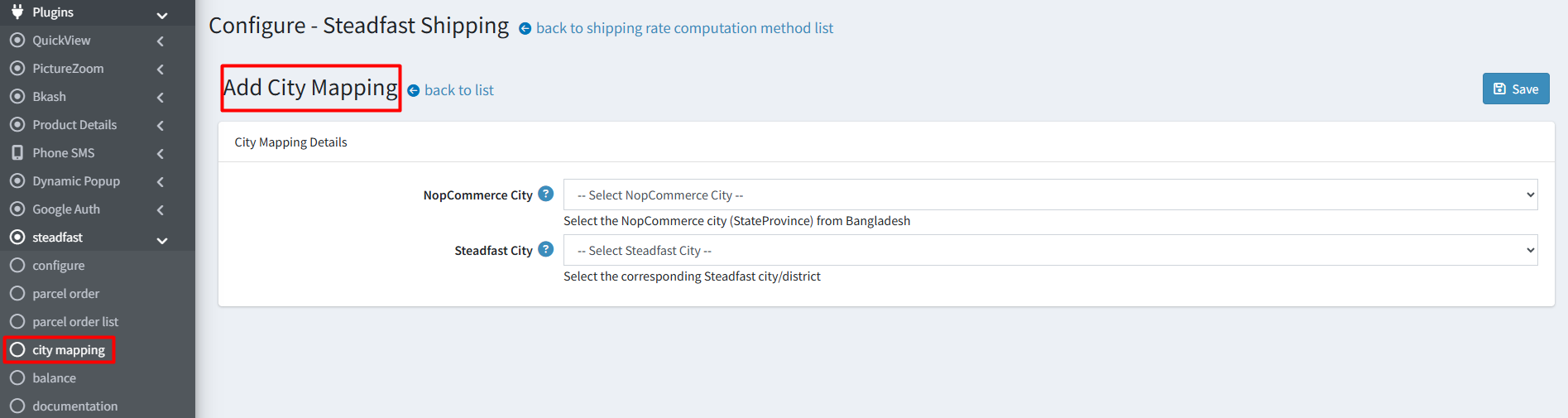
- To link your store's locations with the courier's system, click ‘Add New Mapping’ button to pair a NopCommerce city with its corresponding Steadfast city, also all saved pairs can be managed and viewed within this city mapping section.
Parcel Order List:
- This section displays a comprehensive list of all customer orders processed via Steadfast Shipping. Admin can see key details such as Consignment ID, Tracking Code, and Recipient Name at a glance.
- Click Create New Order button to keep record and process shipments for orders received outside your website manually.
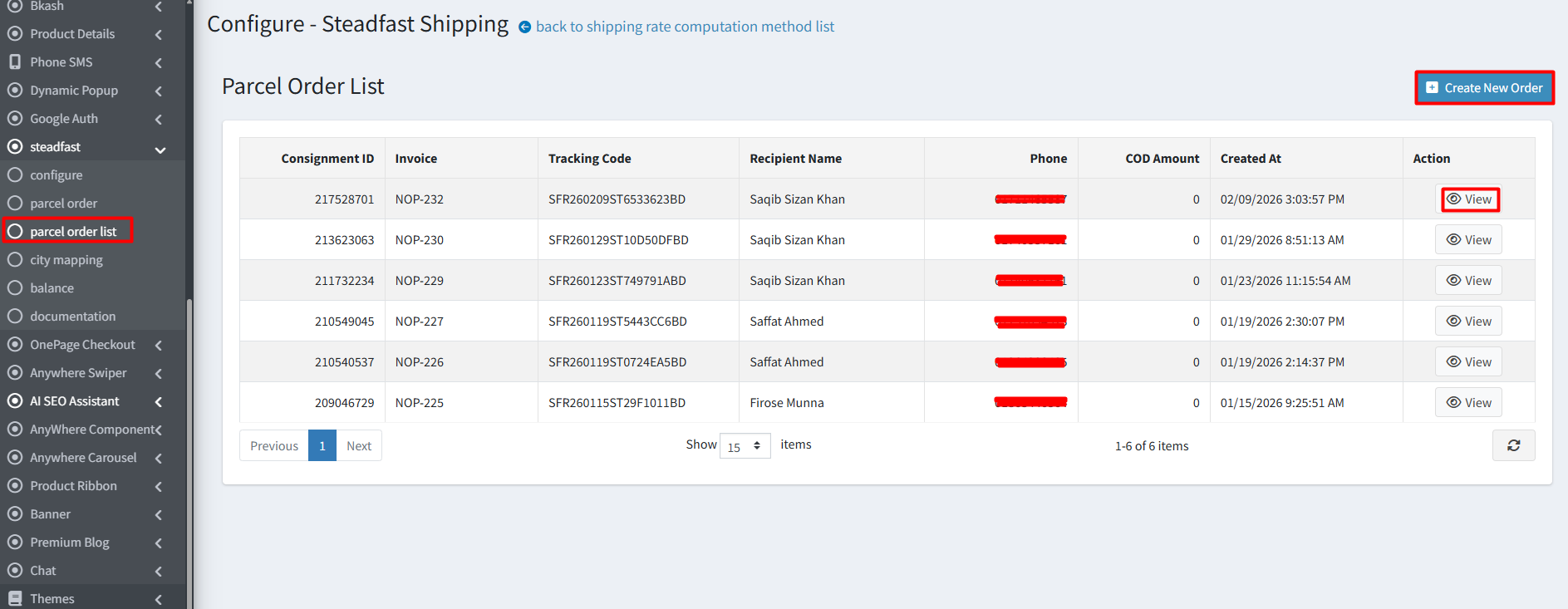
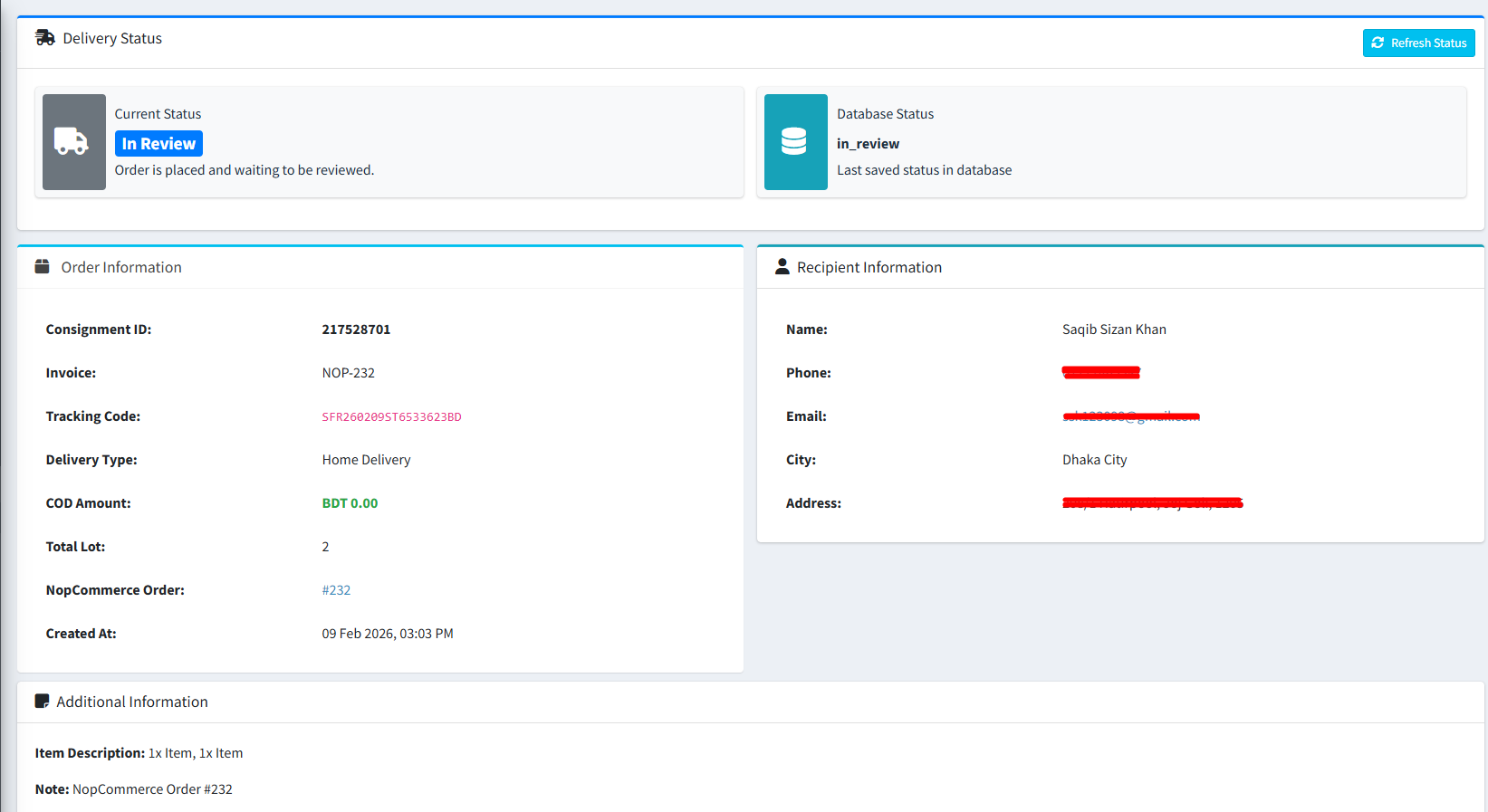
- For a detailed breakdown of an individual order, including its current status and recipient address, simply click the ‘View’ button to open the specific order details page.
Parcel Order Configuration
Store owners can manually create and record orders that are placed outside the website (for example, orders received via phone, social media, or in person). Owner can store complete order information such as Order Details, Recipient Information, and Parcel Information to keep a proper record of those transactions.
Order Details
- Invoice: Enter unique invoice number including hyphens and underscores (e.g., INV-001, abc123)
- NopCommerce Order ID: Enter an Order ID to link to NopCommerce order ID
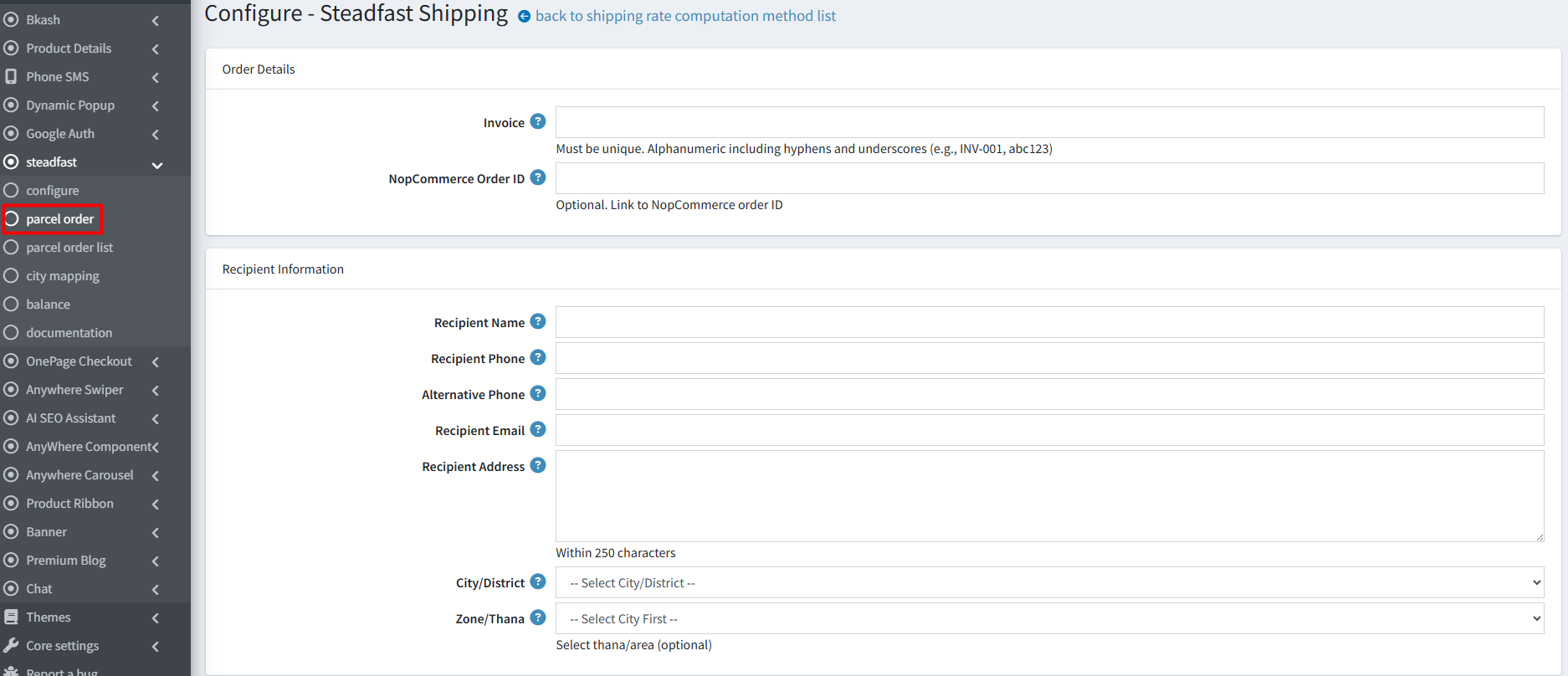
Recipient Information
- Recipient Name: Enter recipient’s full name within 100 characters
- Recipient Phone: Enter recipient’s 11 digit phone number
- Alternative Phone: Enter an alternative 11 digit phone number
- Recipient Email: Enter recipient’s email address
- Recipient Address: Set recipient’s full delivery address within 250 characters
- City/District:Select city / district for delivery
- Zone/Thana: Enter thana or area name for delivery
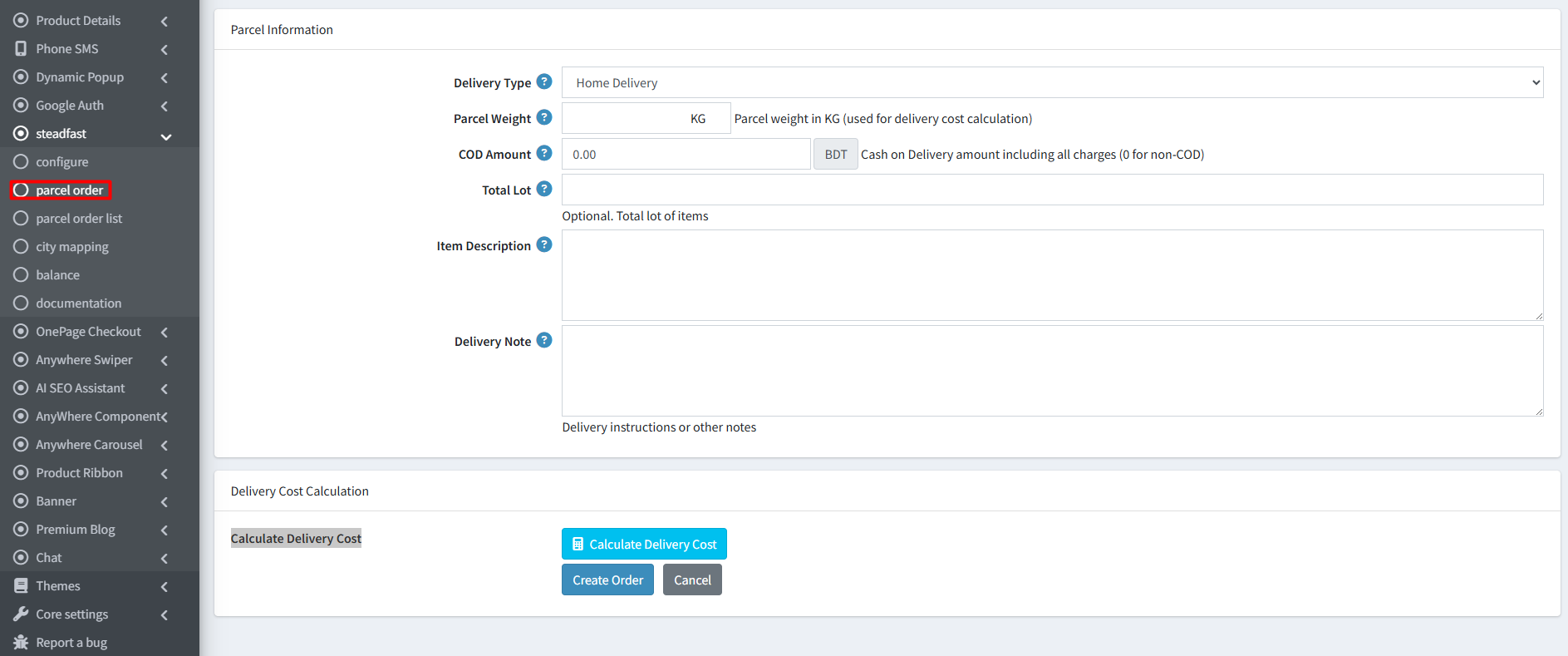
Parcel Information
- Delivery Type: Select delivery type (Home / Point delivery / Hub Pickup)
- Parcel Weight:Enter parcel weight in KG to calculate delivery cost
- COD Amount: Cash on Delivery amount including all charges
- Total Lot: Enter total lot of item
- Item Description: Item names and other information
- Delivery Note: Enter any delivery instructions or other notes
Delivery Cost Calculation
- Calculate Delivery Cost: By selecting city/ district you can calculate delivery cost
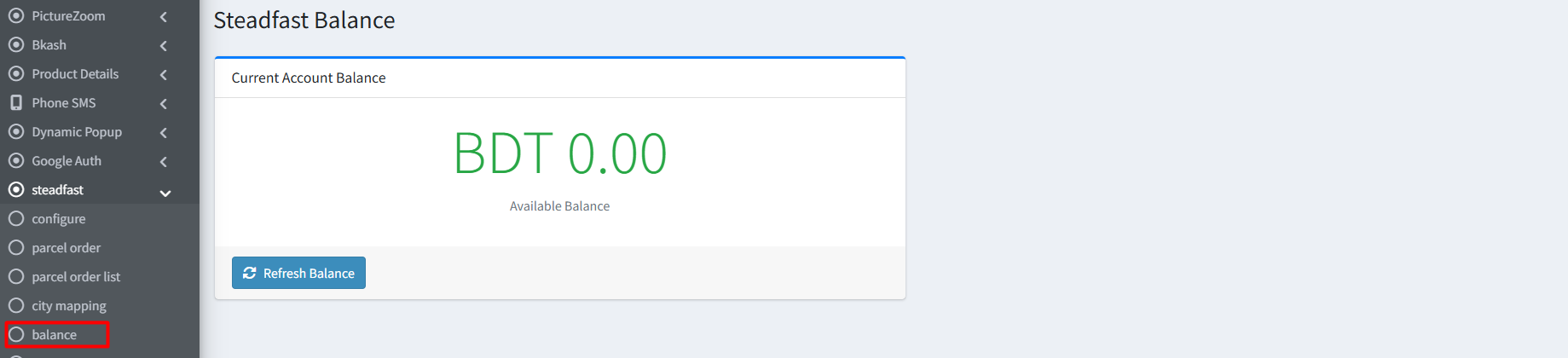
Balance
- Steadfast Balance: You can see your current available account balance in BDT and use Refresh Balance button to update the figure in real time
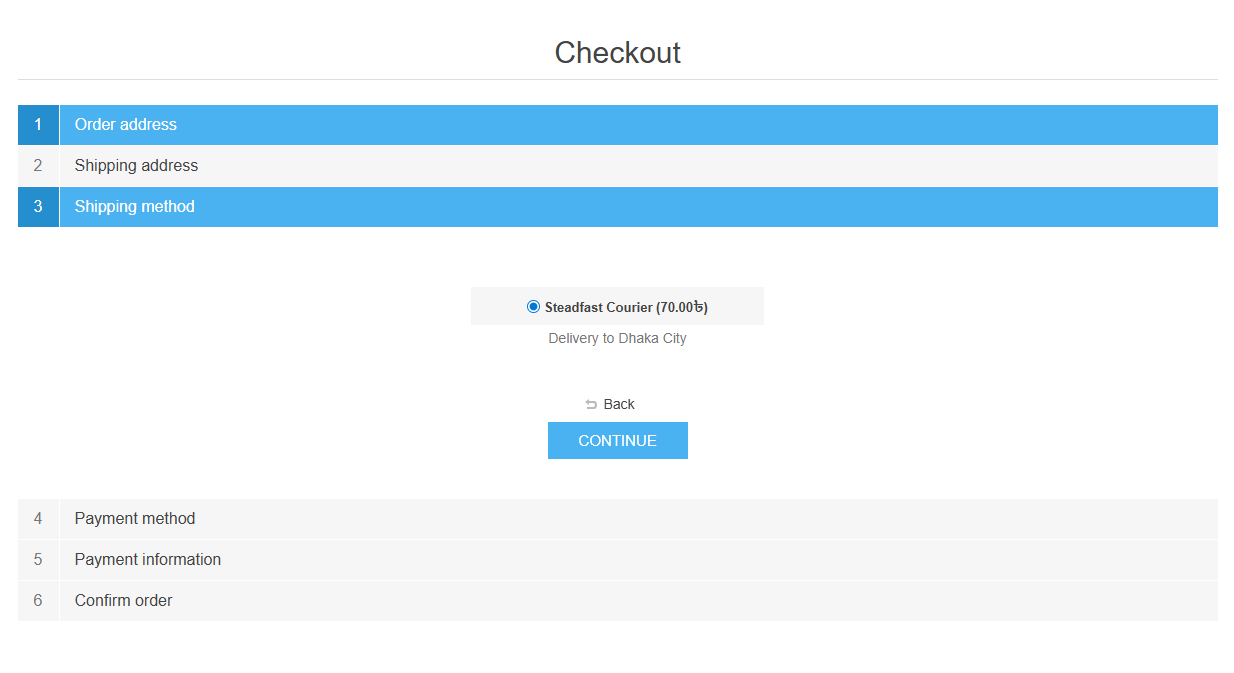
Public View:
Features :
- Quick Installation: Simple configuration and compatibility with multiple stores make integration effortless.
- Nationwide Coverage: Seamlessly ship across 64 districts and 490+ sub-districts in Bangladesh.
- Location Integration: Link your store’s locations with Steadfast courier cities for smooth shipping operations.
- Instant Cost Calculation: Automatically calculate shipping costs based on city, district, and parcel weight for accurate pricing.
- Order Tracking Dashboard: View all orders with Consignment ID, Tracking Code, and recipient details.
- Manual Order Creation: Easily create new orders with detailed recipient info and special delivery instructions.
- Real-Time Monitoring: Track your account balance and consignment status with unique tracking codes for secure, on-time deliveries.
- Reliable Payment Handling: Benefit from next-day payments, best COD rates, and reliable cash handling.
Documentation Menu
NopFashion Theme + 15 Plugin Bundle for NopCommerce
NopBeauty Theme + 12 Plugin Bundle for NopCommerce
NopNoor Theme + 16 Plugin Bundle for NopCommerce
NopGadget Theme + 18 Plugin Bundle for NopCommerce
NopEthnic Theme + 17 Plugin Bundle for NopCommerce
NopFurniture Theme + 19 Plugin Bundle for NopCommerce
NopPharma Theme + 16 Plugin Bundle for NopCommerce
NopVogue Theme + 17 Plugin Bundle for NopCommerce
NopGadence Theme + 18 Plugin Bundle for NopCommerce


